One app for every business, including jewellers.
Your books stay on your own PC. Tally-style accounting for traders, retailers and service firms, and for a jeweller the same books with grams beside rupees. Every counter on your shop network works with it, and billing carries on when the internet doesn’t.
Try it before you buy: without a licence the app runs in educational mode.
Rojmel for 28 October
Shree Demo Jewellers
| Particulars | Cash (₹) | Gold fine (g) |
|---|---|---|
| Opening balance | 5,08,521.36 | 142.380 |
| JamaCounter sale R0042, gold ring 22K | 78,412.00 | |
| JamaFine gold from Shah Bullion | 50.000 | |
| NaameGold to karigar Ramesh, for bangles | 24.000 | |
| NaameShop rent for October | 35,000.00 | |
| Closing balance | 5,51,933.36 | 168.380 |
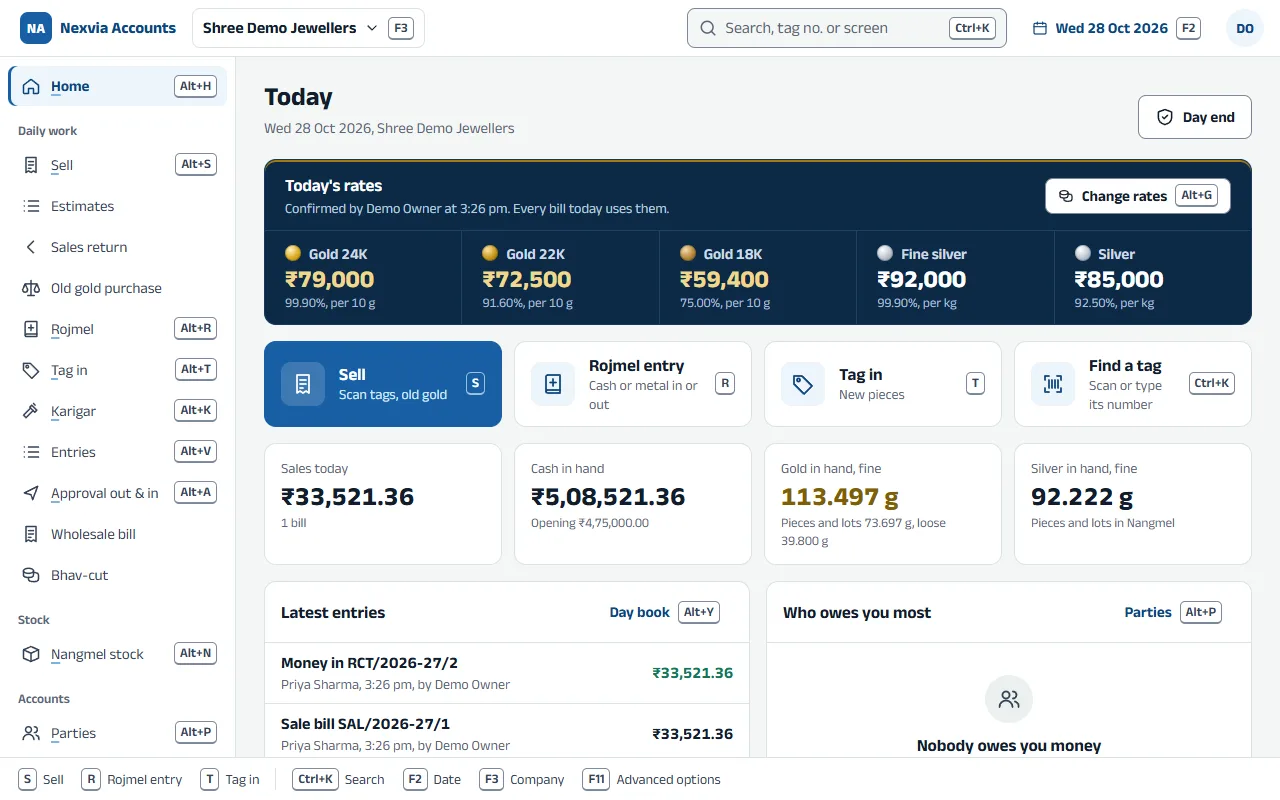
The first screen of the day
A jewellery shop opens to today’s confirmed rates, anything that needs the owner, and the day’s cash, sales and gold in hand. Screens show sample data.
Made for two kinds of company
Each company you create is a jewellery company or a normal one. A normal company never shows tags, metal or karigars. A jewellery company has everything a normal one has, plus the jewellery side.
Jewellery company
With the Jewellery licence
Sell by scanning the tag
ReadyEach piece is priced at today’s rate for its own purity, with making per gram, as a % or fixed, stones and discount. The bill adds up as you scan.
Rojmel (day book)
ReadyCash and each metal, jama and naame, day by day: opening plus jama minus naame equals closing.
Tag in
ReadyNew pieces from a supplier, a karigar or your opening stock: gross, stones, net, purity, fine and cost on each tag, with the next tag number ready.
Nangmel stock (tag stock)
ReadyEvery piece, where it sits, and its whole history: tagged in, moved, sold, returned.
Karigar issue and receipt (goldsmiths)
ReadyGive fine or raw metal, take finished pieces back as tags, allow wastage, and see how much fine each karigar holds, with an alarm past your loss limit.
Normal company
With the Standard or the Jewellery licence
Entries with F4 to F9 (vouchers)
ReadyContra, Payment, Receipt, Journal, Sales and Purchase on the same keys as Tally, and F10 for the rest. The balancing line fills itself.
The statements your CA asks for
ReadyDay book, ledger, trial balance, profit and loss, and balance sheet. Open any group and go down to the entry.
Items with unit, HSN and rates
ReadyWhat you buy and sell, its unit, its HSN or SAC code, and its sale and purchase rates.
Your GST rate list (HSN / SAC)
ReadyThe rate for each HSN or SAC code, kept once for every bill to use.
Import from Excel
ReadyParties, items and opening balances from a spreadsheet, checked line by line before anything is saved.
Where your books live
Your books are always kept on your main PC. Reaching them from a phone or another branch is a choice you make for each company. Here is exactly what each choice keeps with Nexvia.
| On your PCThe defaultReady | PC, plus phone and websiteThrough Nexvia’s relayReady | PC, plus an online copyKept in IndiaReady | |
|---|---|---|---|
| Where the books are | On your main PC | On your main PC | On your main PC, and a copy on Nexvia’s servers in India |
| Other PCs in the shop | As many as you like, over the shop network | As many as you like, over the shop network | As many as you like, over the shop network |
| Phone and website | No | Yes, while the main PC is on and online | Yes, at any time |
| When the main PC is off | Counters wait until it is back | Phone and website access stops until it is back | The last copy still opens; new entries wait and go in when it is back |
| Kept on Nexvia’s servers | Nothing | Nothing, except entries waiting for your main PC, sealed so only it can open them | An encrypted copy of the books. Nexvia’s server can open it, to show it on your phone and website |
On your PCThe defaultReady
- Where the books are
- On your main PC
- Other PCs in the shop
- As many as you like, over the shop network
- Phone and website
- No
- When the main PC is off
- Counters wait until it is back
- Kept on Nexvia’s servers
- Nothing
PC, plus phone and websiteThrough Nexvia’s relayReady
- Where the books are
- On your main PC
- Other PCs in the shop
- As many as you like, over the shop network
- Phone and website
- Yes, while the main PC is on and online
- When the main PC is off
- Phone and website access stops until it is back
- Kept on Nexvia’s servers
- Nothing, except entries waiting for your main PC, sealed so only it can open them
PC, plus an online copyKept in IndiaReady
- Where the books are
- On your main PC, and a copy on Nexvia’s servers in India
- Other PCs in the shop
- As many as you like, over the shop network
- Phone and website
- Yes, at any time
- When the main PC is off
- The last copy still opens; new entries wait and go in when it is back
- Kept on Nexvia’s servers
- An encrypted copy of the books. Nexvia’s server can open it, to show it on your phone and website
Branches outside the shop network can use the same app through the relay, with the Branch access add-on. Coming soon
Simple until you need more
A small shop sees only what it uses. Tally-style extras wait in Advanced options (F11): switch one on and it appears wherever it belongs; switch it off and it hides again, with everything you entered kept.
Coming next
Being built now. Each one arrives as an update to the same app.
e-Invoice and e-Way bills, unlimited
Coming soonThe IRN, its QR and e-way bills straight from the bill, with no charge per bill. Your portal login stays on your PC. Jewellery (HSN chapter 71) doesn’t need e-way bills, so you are never asked for one.
Receipts that post themselves
Coming soonConnect your own Cashfree or Razorpay account: when a customer pays a bill’s QR, the receipt is posted against that bill by itself. The money goes straight into your own account; Nexvia never handles it.
Phone app
Coming soonAndroid and iPhone, with the same screens and the same sign-in.
Hindi and Gujarati screens
Coming soonThe same app in the language your staff read best.
Unlimited e-Invoice and e-Way bills will be part of every licence, with no charge per bill.
Books that are hard to lose
Built for a shop PC that might be old, shared, or switched off at the wrong moment.
Locked to your PC
The books are encrypted on disk. Copied to a pen drive, they can’t be opened anywhere else.
A recovery code
Twenty-four letters you write down once. With them, a backup opens on a new PC if this one dies.
Backups that are checked
Every night the app makes a backup, opens it to prove it is complete, and keeps the last 30.
A standby PC
A second PC can hold a live copy of every saved entry, ready to take over if the main PC fails.
An online copy
Keep a copy on Nexvia’s servers in India, so the books open even when the main PC is off.
An audit trail you can’t switch off
Every save, change and cancellation is kept with who and when, as the Companies Act asks.
Private Books for owners
Each owner or partner can keep their own money in Private Books. Staff never see them: not in menus, lists, searches or reports.
Try it on your shop’s PC
Download the app, create a company and enter a few days of work. Until your licence is active it runs in educational mode: everything opens, and entries can be dated only the 1st, 2nd or 31st of a month.